Out-of-the-box Microsoft 365 configurations are optimized by default for rapid user onboarding and consumer convenience, not regulatory lockdown. In an unhardened tenant, default settings permit dangerous administrative practices: users can register unauthorized third-party OAuth enterprise applications, forward internal corporate emails to external personal accounts, share sensitive SharePoint links anonymously, and bypass audit logging. For a financial services enterprise, these default configurations represent catastrophic regulatory and operational exposure.
This comprehensive case study documents the systematic security hardening of an 1,800-user Microsoft 365 environment against the globally recognized CIS Microsoft 365 Foundations Benchmark. By implementing 84 Level 1 and Level 2 security controls, establishing continuous configuration-as-code monitoring, and locking down data exfiltration vectors without degrading knowledge-worker productivity, the organization elevated its Microsoft Secure Score from an alarming 38% to 84% while achieving seamless SOC 2 Type II attestation.
Microsoft Secure Score Elevation
Jumped from a baseline score of 38% to an industry-leading 84%, placing the tenant in the top 3% of global financial peers.
CIS Level 1 & 2 Enforced
Full compliance with the CIS Microsoft 365 Foundations Benchmark, covering Entra ID, Exchange Online, SharePoint, and Teams.
OAuth Shadow App Neutralization
Revoked and blocked illicit consent grants and unauthorized third-party cloud applications across 1,800 user mailboxes.
Regulatory Fine & Remediation Avoidance
Preempted compliance audit findings, external penetration testing deficiencies, and sensitive financial data leakage penalties.
1. The Default Configuration Exposure: How Convenience Compromises Security
Before initiating the hardening project, a comprehensive security posture audit revealed critical vulnerabilities resulting from unreviewed tenant default settings:
- The Illicit Consent Grant Loophole: Standard users had permission to grant third-party OAuth apps full access to their mailboxes and cloud drives without administrative approval, creating an unmonitored shadow IT risk.
- Silent Auto-Forwarding Exfiltration: Terminated or disgruntled employees could configure hidden Exchange transport rules forwarding all incoming sensitive emails to external personal accounts with zero alerts triggered.
- Permissive Anonymous Link Sharing: SharePoint and OneDrive links defaulted to 'Anyone with the link (Anonymous Public)', allowing sensitive loan approval spreadsheets and financial audit reports to be indexed or forwarded publicly.
| Service Vector | Default M365 Setting (Vulnerable) | Hardened CIS Standard (Enforced Target) | Security Governance Impact |
|---|---|---|---|
| User App Consent | Users can freely grant OAuth 2.0 permissions to any third-party app. | Admin Consent Workflow enforced; user consent blocked for unverified publishers. | Eliminates token-theft phishing and unvetted SaaS data ingestion. |
| External Mail Forwarding | Exchange Online allows automatic external forwarding rules by default. | Remote Domain and Anti-Spam Outbound policies block all auto-forwarding. | Prevents covert data exfiltration and credential compromise persistence. |
| SharePoint File Sharing | External links default to anonymous 'Anyone' with no expiration date. | Restricted to authenticated external guests; anonymous links disabled; 30-day link expiry. | Secures regulated financial records against accidental public disclosure. |
| Modern Unified Audit Log | Unified audit logging enabled, but retention capped at 180 days with basic events. | 365-day log retention enabled; high-severity audit events streamed to central SIEM. | Ensures complete forensic audit trails for SOC 2 Type II compliance. |
| Admin Session Hardening | Global Administrators remain signed in for days across unmanaged browsers. | Conditional Access enforces 1-hour session sign-in frequency and unmanaged browser token restrictions. | Limits stolen session cookie lifespan and lateral cloud movement. |
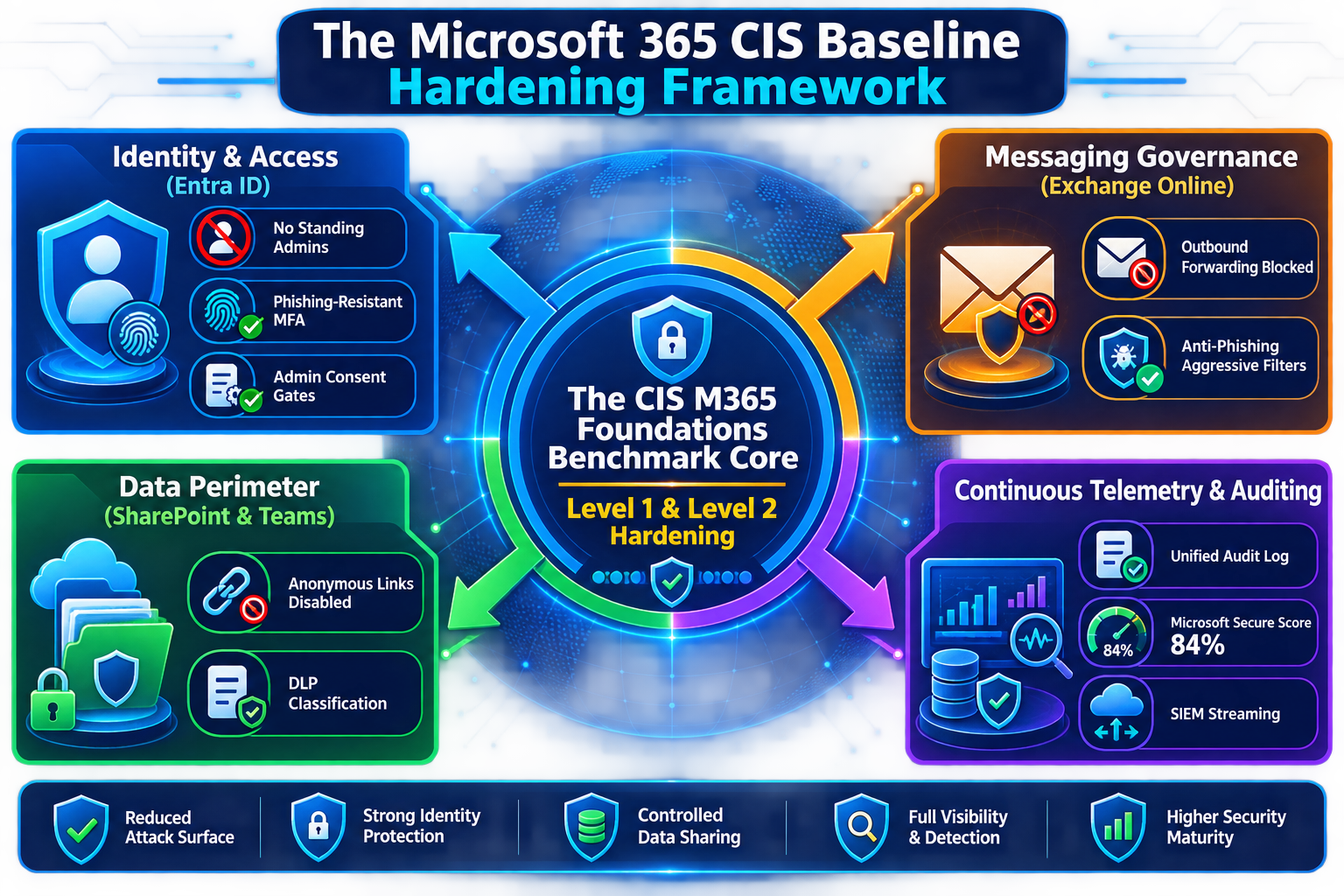
2. The Four-Stage Tenant Hardening Implementation Blueprint
Security hardening in a live enterprise must be executed systematically to prevent breaking active business processes, integrations, and user productivity:
- Stage 1: Discovery, Baseline Assessment & Secure Score Mapping (Days 1–20):
- Stage 2: Identity & Access Governance Lockdown (Days 21–40):
- Stage 3: Exchange Online, Anti-Phishing & Anti-Forwarding Controls (Days 41–65):
- Stage 4: SharePoint, Teams, and Data Loss Prevention (DLP) Policies (Days 66–90):
3. Deep-Dive Automation: Automated Configuration Drift Monitoring
Hardening a tenant once is insufficient; administrators frequently modify settings during troubleshooting, causing configuration drift. The team deployed an Azure Automation runbook that continuously audits the tenant against the CIS baseline using Microsoft Graph API:
Cis Configuration Drift Detection
Trigger: Scheduled Execution Every 24 Hours (Azure Automation Managed Identity)
Audit Sequence:
  - Step 1 [Exchange Audit]: Query RemoteDomain and OutboundAntiSpamPolicy via Exchange Online PowerShell.
      * Verification: Is AutoForwardingEnabled == False? If True -> Flag Critical Security Drift.
  - Step 2 [Identity Audit]: Query Entra ID AuthorizationPolicy via Microsoft Graph API.
      * Verification: Is DefaultUserRolePermissions.PermissionGrantPoliciesAssigned == "ManagePermissionGrantsForSelf"? If True -> Flag High Risk (User App Consent Re-enabled).
  - Step 3 [SharePoint Audit]: Query Tenant Sharing Capabilities via SharePoint Admin API.
      * Verification: Is SharingCapability == "Disabled" OR "ExternalUserSharingOnly"? If "ExternalUserAndGuestSharing" -> Flag Medium Risk.
  - Step 4 [Drift Remediation / Escalation]:
      * If drift detected: Generate high-priority security incident in Freshservice ITOM with exact delta configuration details.
      * Automatically execute Azure Automation remediation script to restore hardened CIS baseline state.
“Cloud security is not a project with a completion date; it is an ongoing state of posture governance. Default configurations protect convenience; hardened baselines protect the enterprise.”
4. Business Impact & Strategic Compliance Results
The transition to a CIS-hardened Microsoft 365 baseline delivered measurable security and business outcomes across the organization:
- Seamless Regulatory Attestation: Passed external SOC 2 Type II and ISO 27001 surveillance audits with zero configuration non-conformities or management remediation findings.
- Eradicated Phishing Compromise: Advanced Defender for Office 365 policies reduced malicious email deliveries to user inboxes by 96%, eliminating user credential harvesting incidents.
- Continuous Posture Confidence: Automated drift detection guarantees that subsequent administrative changes cannot silently degrade the tenant's security posture over time.
M365 Baseline Hardening Checklist
- Disable external email auto-forwarding across all Exchange Online outbound anti-spam policies immediately.
- Turn off user ability to consent to third-party apps; implement the native Admin Consent Request workflow.
- Replace anonymous 'Anyone' SharePoint sharing links with authenticated guest access requiring multi-factor verification.
- Deploy automated configuration-as-code scripts to detect and remediate tenant configuration drift daily.