For a 24/7 healthcare enterprise managing clinical communications, patient scheduling, and regulated pharmacy records, an email outage is not a temporary inconvenience—it is a direct threat to patient care and operational compliance. When an enterprise operates 2,800 active mailboxes across 45 terabytes of on-premises Exchange storage, executing a cloud migration cannot rely on disruptive cutover weekends or scheduled downtime windows.
This case study documents the architectural strategy and phased execution of a zero-downtime messaging migration to Microsoft 365. By architecting an Exchange Classic Full Hybrid topology with cross-premises free/busy federation, centralized mail transport, and Mailbox Replication Service (MRS) pre-seeding pipelines, the organization migrated 45TB of messaging data across six regional hospitals without dropping a single email or interrupting 24/7 clinical operations.
Clinical Messaging Downtime
Mailbox switchovers executed dynamically in the cloud; zero user disconnects or lost emails during 24/7 hospital shifts.
Regulated Data Preserved
Successfully synchronized 2,800 primary and archive mailboxes with 100% cryptographic data integrity and complete audit trails.
Cross-Premises Calendar Sharing
Maintained bi-directional free/busy scheduling visibility between on-premises and cloud users throughout the 120-day migration window.
Annual Data Center SAN & Licensing Savings
Decommissioned on-premises Exchange DAG storage arrays, third-party backup agents, and redundant Edge Transport hardware.
1. The Architectural Challenge: 24/7 Coexistence in a Regulated Environment
Before initiating migration traffic, the engineering leadership evaluated migration approaches. A cutover or staged migration was immediately rejected due to regulatory compliance and the strict requirement for cross-premises calendar coexistence during the multi-month transition:
- The 24/7 Clinical Shift Challenge: Doctors and triage nurses operate across rolling 12-hour shifts; freezing mailboxes for overnight batch exports would disrupt critical clinical handoffs.
- Regulated Retention Mandates: HIPAA and pharmaceutical regulatory frameworks required preserving original message timestamps, folder hierarchy metadata, and litigation-hold compliance records without alteration.
- Hybrid Scheduling Friction: For four months, department heads on-premises needed seamless calendar visibility to schedule operating rooms and shift rotas with clinical leads already moved to Exchange Online.
| Migration Vector | Cutover Migration (High Risk / Fails) | Classic Full Hybrid Architecture (Target State) | Enterprise Operational Value |
|---|---|---|---|
| User Downtime | High (Entire tenant cuts over simultaneously over a weekend; users locked out). | Zero (Background MRS pre-seeding; instantaneous final delta switchover). | 24/7 hospital shifts continue uninterrupted without user intervention. |
| Outlook Profile Behavior | Broken profiles; requires manual OST rebuild and credential reset for every user. | Seamless Outlook Autodiscover redirection; zero profile rebuilds required. | Eliminates 2,800 service desk tickets for Outlook profile reconfiguration. |
| Free/Busy Calendar Visibility | Destroyed; on-premises and cloud users cannot view availability until 100% cutover. | Continuous bi-directional free/busy federation via Organization Relationships and OAuth. | Departmental cross-scheduling operates seamlessly across all 120 days. |
| Mail Flow & Compliance Routing | Split MX records causing delivery bounces and uninspected external mail. | Centralized Mail Transport (CMT); all inbound/outbound mail routes via central DLP cluster. | Guarantees continuous compliance inspection and unified audit logging. |
| Network Bandwidth Impact | Network saturation; massive simultaneous data streams choke clinical circuits. | Governed MRS proxy concurrency limits with off-peak delta synchronization. | Protects clinical WAN bandwidth for electronic health record (EHR) systems. |
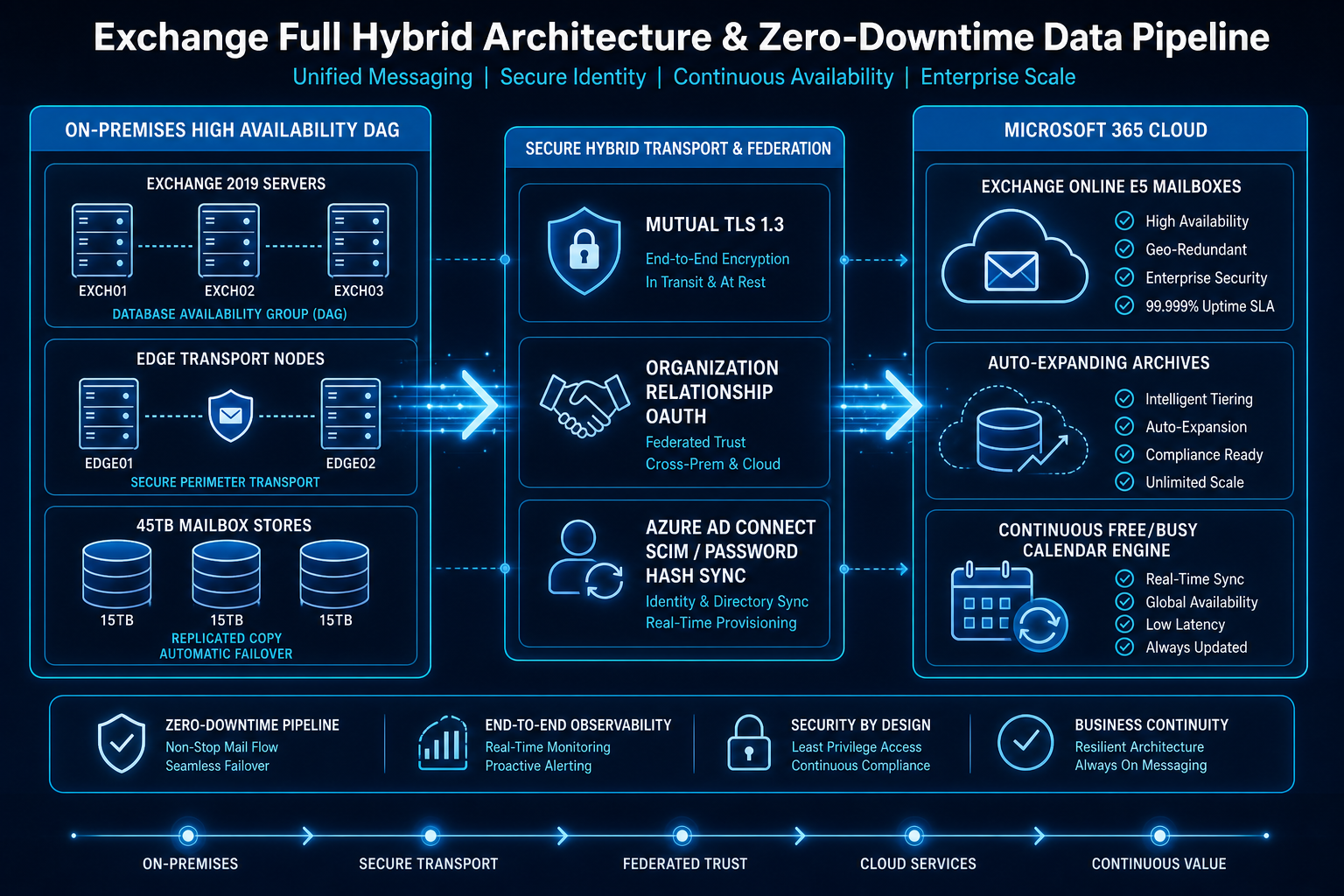
2. The Four-Stage Zero-Downtime Execution Framework
Executing a zero-downtime migration across 2,800 users requires separating the data transmission phase from the final cutover trigger:
- Stage 1: Identity Synchronization & Certificate Infrastructure (Days 1–20):
- Stage 2: Hybrid Configuration Wizard & Organization Relationships (Days 21–40):
- Stage 3: MRS Migration Batching & Background Pre-Seeding (Days 41–100):
- Stage 4: Automated Delta Finalization & Client Redirection (Days 101–120):
3. Deep-Dive Migration Orchestration: The MRS Delta Batching Routine
The technical mechanism ensuring zero downtime is the continuous background synchronization orchestrated via Exchange Online Mailbox Replication Service (MRS):
Hybrid Mailbox Migration Pipeline
Trigger: PowerShell Migration Batch Initialization (Exchange Online Management Module)
Pre-Flight Checks:
  - Verify Target Mailbox Size <= 100GB (Auto-Expanding Archive configured for large mailboxes)
  - Verify On-Premises Mailbox Database Replication Health (DAG Copy Status = Healthy)
  - Validate Hybrid OAuth Token Exchange Status = Success
Migration Execution Sequence:
  - Step 1 [Initial Seed]: MRS Proxy establishes encrypted RPC-over-HTTPS tunnel to on-premises CAS.
  - Step 2 [Background Sync]: Stream primary mailbox and archive data blocks to cloud target while user works actively on-premises.
  - Step 3 [Continuous Delta Sync]: Execute recurring delta replication every 24 hours to sync newly received emails.
  - Step 4 [Cutover Trigger]: On scheduled completion date, execute final delta sync (syncs final uncopied messages).
  - Step 5 [Target Finalization]: Convert on-premises mailbox to RemoteMailbox object; enable cloud mailbox.
  - Step 6 [Client Redirection]: Autodiscover V2 signals active Outlook and mobile clients to point to Exchange Online endpoint without requiring profile rebuild.
“A successful enterprise cloud migration is one where thousands of users walk into the office on Monday morning, open their inbox, and have zero awareness that 45 terabytes of critical infrastructure just moved beneath them.”
4. Operational & Governance Results
At the conclusion of the 120-day migration program, the organization realized significant operational and financial gains:
- Zero Lost Messages & Zero Disruption: All 2,800 mailboxes and 45TB of data moved to Exchange Online with zero lost messages and zero escalated clinical downtime events.
- Consolidated Security & Compliance: Replaced legacy third-party email hygiene appliances with native Microsoft Defender for Office 365, delivering unified anti-phishing, safe attachments, and automated purge capabilities.
- Simplified Administrative Overhead: Deprecated four on-premises Exchange DAG database servers and freed 120TB of tier-1 SAN storage, returning compute capacity to core hospital clinical application clusters.
Enterprise Hybrid Messaging Checklist
- Run the Exchange Server Health Checker script prior to HCW deployment to remediate outdated cumulative updates and cipher suites.
- Establish strict MRS concurrency limits on on-premises CAS servers to prevent migration traffic from choking production client RPC connections.
- Ensure hybrid OAuth federation is verified and tested across multiple test mailboxes before scheduling production user batches.
- Keep a lightweight, supported on-premises Exchange management server for recipient management until directory synchronization is decoupled.